

Captions so accurate you barely need to edit. Proper punctuation, natural line breaks, 50+ languages. Export as SRT, VTT, TTML, and more.
Try it Free · No credit card required











We orchestrate multiple transcription, translation, and AI engines. Our proprietary segmentation technology transforms raw output into natural, well-timed subtitles ready for the screen.

Grow your audience with accurate captions in every language your viewers speak.
Turn episodes into searchable transcripts and ready-to-post video clips.
Caption onboarding and compliance videos for global, multilingual teams.
Localize campaign videos fast without waiting on manual translation.

Make courses accessible and boost comprehension with professional subtitles.
Speed up subtitle delivery with AI-first drafts your editors can refine.
“YouTube or Zoom already auto-caption my videos.”
They do, but without punctuation, capitalization, or line breaks. Your viewers notice. Upload to Fluen, get broadcast-quality captions, and export a clean SRT or burned-in MP4 in minutes.
“I'll just fix the auto-captions manually.”
A 30-minute video has ~400 subtitles. At 99.2% accuracy with smart segmentation, Fluen handles the punctuation, line breaks, and speaker labels for you. Most files need barely any edits.
“Sounds great, but I have hundreds of videos.”
Upload them all. Fluen processes files in parallel, so you can queue an entire content library and download clean SRTs for everything at once. Start with 3 free files to see the quality for yourself.
We route your file to the best speech engine for your content. Different engines for interviews, podcasts, lectures, and noisy environments. The result is consistently higher accuracy than any single engine can deliver on its own.
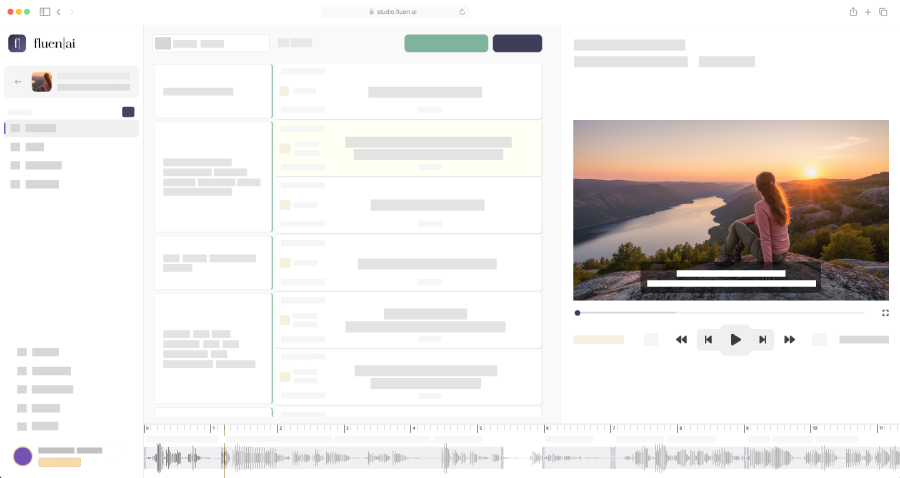
See how engine routing worksReview captions synced to your video. Adjust timing, fix a word, split or merge subtitles. Everything runs in your browser, so there's nothing to download or install. Just open your project and start editing.
Explore the visual editorFull control over font, color, size, and position. Generate burned-in MP4s ready to upload to YouTube, Instagram, or any platform. Preview your styling in real time before exporting.
Dive into burn-in detailsDefine how technical terms, brand names, and industry jargon should appear in your captions. Your glossary ensures Kubernetes stays "Kubernetes" and not "Cooper Netties." Once saved, it applies automatically to every future upload.
See the glossary in actionUpload an entire content library. Queue files, process in parallel, and download subtitle files for all of them at once. Ideal for teams managing large backlogs of video or audio content.
Automate via the APIOnce your captions are ready, translate them into 50+ languages with a single click. Fluen's context-aware AI doesn't just swap words: it re-segments every subtitle for the target language, respecting character-per-line limits and natural reading flow. The result: subtitles that read like they were written by a native speaker.
Upload your video to Fluen, and our AI generates accurate captions automatically. Review and edit them in our built-in subtitle editor, then export as SRT, WebVTT, TTML, and more to upload to YouTube, Vimeo, or any platform. You can also choose burned-in MP4 to have the subtitles embedded directly into your video file.
Fluen achieves up to 99.2% accuracy by routing your file to the best speech-to-text engine for your content type, language, and audio quality. Combined with our smart segmentation, captions come out well-punctuated, properly capitalized, and split at natural sentence boundaries.
Fluen supports all major video formats including MP4, MOV, MKV, and AVI, as well as audio formats like MP3, WAV, M4A, and FLAC. If you already have subtitle files, you can import SRT files directly during the caption review step.
Yes. Fluen can generate a burned-in MP4 with your subtitles embedded directly into the video. You have full control over font, size, color, position, and background opacity, so your captions look exactly how you want them.
Absolutely. Once you've generated and reviewed your captions, you can translate them into 50+ languages with Fluen's AI translation engine. Translations are context-aware and automatically re-segmented for each target language. Learn more about subtitle translation →
Yes. Fluen works with any aspect ratio, including vertical 9:16 videos from TikTok, Instagram Reels, and YouTube Shorts. Captioning and burned-in export both handle portrait orientation automatically, so your subtitles are always positioned correctly.
Yes. You can sign up and process your first 3 files completely free, no credit card required. This gives you access to the AI captioning engines and the built-in editor so you can evaluate the quality before committing to a plan. See pricing →
Upload your first file. No credit card. No commitment.
Or compare plans