

Upload your video in any of 50+ languages, translate your subtitles to English with context-aware AI, and export production-ready files. No meaning lost, no awkward phrasing.
No credit card required · Try it free





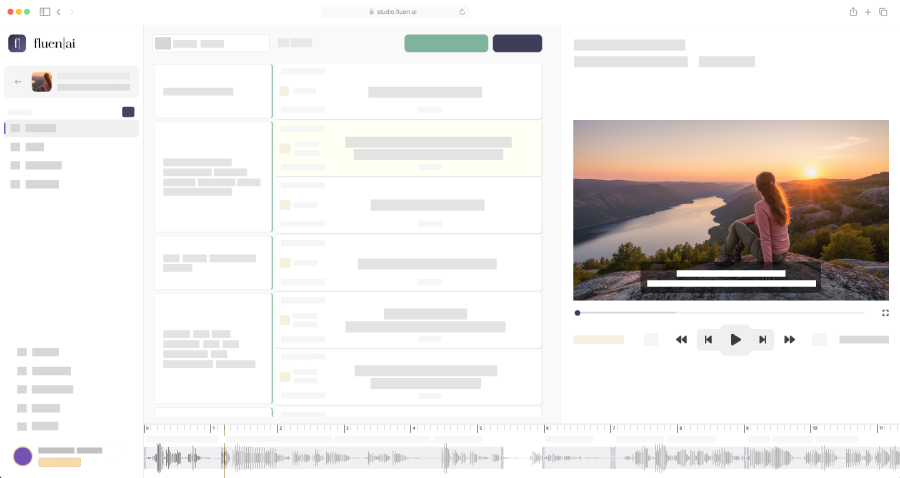
Generic tools translate word-by-word and dump raw text into your subtitle file. Fluen translates in context, then refines across multiple layers to deliver English subtitles that read naturally.
Fluen selects the optimal AI engine for your specific language pair. Japanese to English uses a different model than Spanish to English.
Full paragraphs are translated together, not cue-by-cue. This preserves meaning, tone, and idiomatic flow across subtitle boundaries.
Translated text is re-segmented for English subtitle standards by default: 42 CPL, natural line breaks, proper reading speed. All parameters are fully customizable.
Your Glossary entries are respected. Names, brands, and technical terms are handled exactly as you specify. Punctuation and capitalization follow English conventions.
See how Fluen's multi-layer approach produces English subtitles that flow naturally, with proper segmentation and formatting.
Upload your video and Fluen auto-detects the source language. No manual setup.
Generate source-language captions, then translate to English with a single click.
Have a whole content library? Process multiple files simultaneously.

Drop in your video or audio file in any language. Fluen auto-detects the source language and generates accurate captions. Already have an SRT? Import it directly.
Review the source-language captions, then translate to English with one click. Add Glossary entries for names, brands, and terms that need specific handling.
Preview your English subtitles synced to the video. Fine-tune anything in our built-in editor. Export as SRT, VTT, TTML, SBV, and more.



Fluen orchestrates multiple AI engines and selects the best one for each language pair. The result is English output that captures meaning, tone, and nuance — not just words.
50+ source languages supported · New languages added regularly
Subtitle your content library for English-speaking markets. Deliver broadcast-quality English subtitle files for streaming platforms, international distribution, and licensing.
Make training content accessible across your organization in English. Use Glossary to ensure consistent translation of internal terminology and product names.
Use AI-generated English drafts as a starting point for your linguists. Cut turnaround from days to hours while maintaining the quality your clients expect.
Prepare your films and documentaries for English-speaking audiences — festivals, VOD platforms, theatrical distribution. Production-ready SRT files that meet industry standards.
Fluen uses a multi-engine approach combining DeepL, OpenAI, and proprietary subtitle intelligence. For each language pair, Fluen selects the optimal engine and translates full paragraphs of context — not individual cues — to produce natural English phrasing. The output is then re-segmented to professional subtitle standards (max 42 characters per line, proper reading speed). Most users find the English output needs little to no editing.
Fluen supports 50+ source languages including Spanish, French, German, Portuguese, Japanese, Chinese, Korean, Arabic, Italian, Dutch, Russian, Polish, Turkish, Hindi, Swedish, and many more. The AI auto-detects your source language on upload. View all supported languages →
Yes. If you already have subtitle files in another language, you can import SRT files directly during the caption review step. Fluen will translate them to English with the same multi-layer refinement process — context-aware translation, re-segmentation, and Glossary support.
Fluen includes a Glossary feature that lets you define exactly how specific terms should appear in the English output. Names, brand names, acronyms, and technical vocabulary can be kept as-is or translated to your preferred English equivalent. The AI respects your Glossary entries consistently across all subtitle cues.
Most videos are processed in minutes. A typical 60-minute video takes about 3–5 minutes for captioning and translation combined. The translation step itself is near-instant. You can also batch-process multiple files simultaneously.
Fluen supports SRT, WebVTT, TTML, SBV, ITT, STL, SSA, burned-in MP4 (with customizable subtitle styling), and plain text transcripts. For broadcast and streaming platforms, SRT and WebVTT are the most common. The burned-in MP4 option lets you embed styled English subtitles directly into the video.
Yes. Fluen's English output follows professional subtitle specifications: max 42 characters per line, max 2 lines per cue, appropriate reading speed, and natural line breaks at clause boundaries. These specs are customizable per workspace, so you can match your specific broadcast or platform requirements.
Yes. You can sign up and try the full platform for free, no credit card required. This lets you experience the AI-powered translation, editing, and review tools on your own content. Paid plans start at affordable rates when you're ready to export. See pricing →
Upload your first file free. No credit card, no commitment.
Compare plans